Why Real-World Size Matters in Earring Try-On
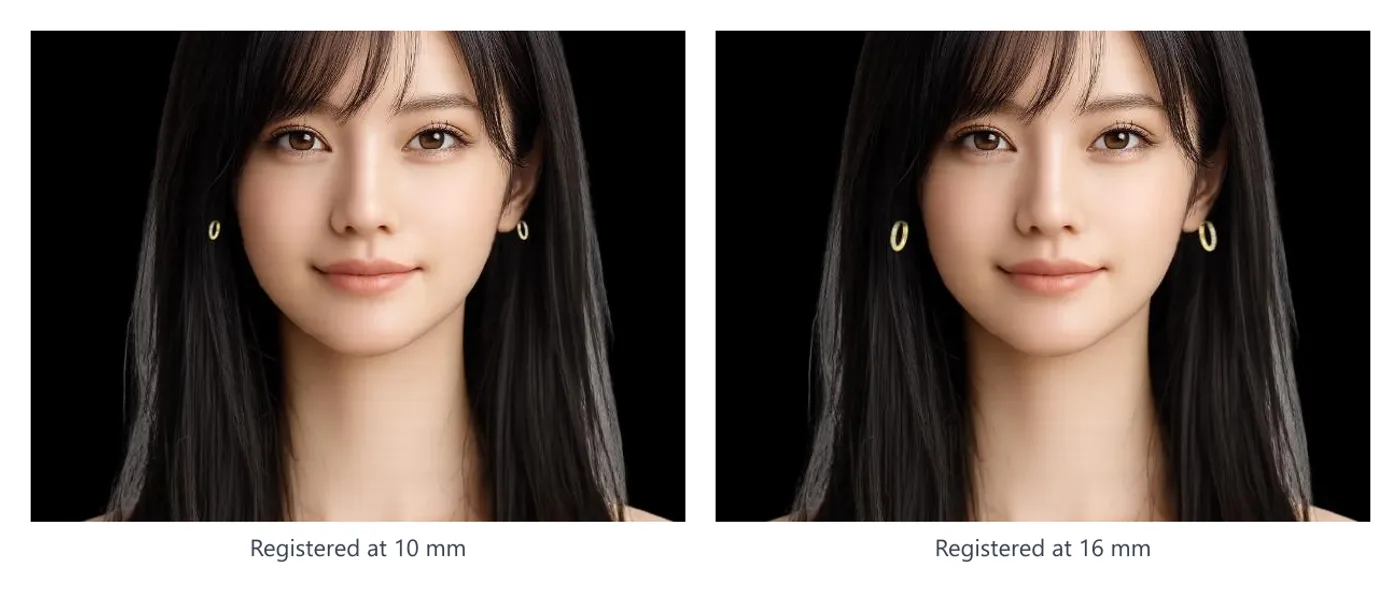
Before a shopper asks whether an earring suits them, they ask how big it is. A 10 mm hoop and a 14 mm hoop look completely different worn; a 3 mm stud and a 5 mm stud are indistinguishable in a product photo.
If try-on can’t answer that, you get “smaller than I expected” and “bigger than I thought” returns. In our own store (Adelina Style), size is among the most common reasons for both questions and returns.
This article is only about size. For how to put virtual try-on for earrings on your store in the first place, see the setup guide.
Placing an image on the ear doesn’t determine size
A transparent PNG carries no size information. A 15 mm stud shot at 1000 px and a 40 mm hoop shot at 1000 px are both 1000 px.
If try-on simply places the image at the ear, the rendered size depends on image resolution and how much margin the store left when cropping — a number that changes with every photo shoot and means nothing.
DokimiAI computes the pixel size every frame from the ear size detected in the camera feed and the real-world size (mm) the store registered. Move closer or farther from the camera and the ratio to the ear stays the same.
You register one number: height
The value is the product’s height in mm — its length along the vertical axis when worn.
| Product | What to register |
|---|---|
| Stud | Vertical length of the decorative part |
| Hoop | Inner diameter + wire thickness × 2 (12 mm hoop in 2 mm wire → 16 mm) |
| Drop / chain | Full length from where it hangs on the lobe to the bottom |
| Ear cuff | Vertical length of the cuff itself |
Width isn’t registered; it follows from the image’s aspect ratio. That’s why cropping the margins tightly matters: leftover space above and below the product gets counted as “height,” and the product renders smaller than it should.
Watch the 21 mm default
If no size is registered, the product renders at 21 mm. That’s a placeholder chosen as an average hoop size — far too big for a stud, too small for a statement hoop.
If you stop after registering the image, every product renders at 21 mm. Earrings vary enormously in size, so enter the value product by product.
Products with size variants
For products offered in 8 / 10 / 12 mm, register a size per variant. When the shopper switches size on the product page, the size on the ear follows.
This is where try-on helps most: choosing hoop diameter. “10 or 12 mm?” can’t be judged from a photo, but switching in try-on answers it at a glance. In our store, size-variant products are exactly the ones we most want people to try on before buying.
You need one image per color, not per size. The same image is rendered at different real sizes.
What it looks like when the number is off
| Symptom | Cause |
|---|---|
| A tiny stud renders larger than the earlobe | Still at the 21 mm default |
| Everything looks too small | Too much margin in the image |
| A hoop looks thin | Wire thickness not added to the height |
| Switching size does nothing | Per-size values left blank |
Checking is easy: try it on your own ear and compare with the real product in your hand. If it doesn’t match, fix the number and reload.
Summary
- A transparent PNG has no size; the registered mm value decides it
- Register one number: height. Hoops = inner diameter + wire × 2
- Don’t leave the 21 mm default in place
- Register per-size for size variants; one image per color is enough
- Verify on your own ear against the real thing
When try-on answers the size question correctly, size inquiries drop and size-related returns drop. Get this right before worrying about image polish.